Building and Killing a Deadlock With Your Own Hands
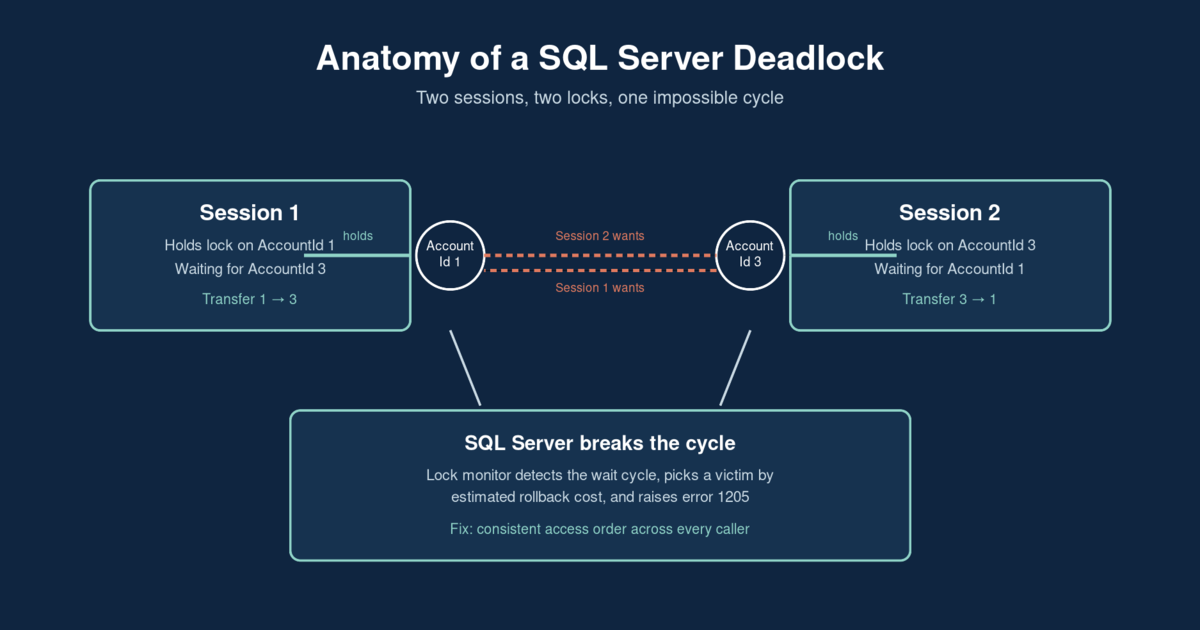
A SQL Server deadlock isn’t random bad luck — it’s two sessions locking the same two resources in opposite order, and it’s fully reproducible on demand. This post builds one on purpose with two concurrent fund transfers, reads the deadlock graph SQL Server already captured, fixes it with a one-line change to lock order, and shows a scheduled way to catch the next recurring pattern before it pages someone.
Key takeaways
- A deadlock needs a cycle: Session A holds a lock Session B wants, and Session B holds a lock Session A wants. Neither can finish.
system_health— the Extended Events session running by default on every SQL Server instance — captures deadlock graphs automatically. You don’t need a custom trace running ahead of time.- SQL Server picks the victim by estimated rollback cost, not simply “whoever asked second.”
SET DEADLOCK_PRIORITYcan override that, but it doesn’t remove the cycle. - The fix for this class of deadlock is almost always consistent access order: every code path that touches the same set of rows should lock them in the same sequence.
- AI is well-suited to parsing deadlock graphs on a schedule and flagging object pairs that deadlock repeatedly — but the actual code fix stays a human decision.
The problem
Two tellers process fund transfers against the same small Accounts table at the same moment. Session 1 moves $100 from account 1 to account 3. Session 2, a second later, moves $50 the other way — from account 3 to account 1. Both call the same procedure:
CREATE PROCEDURE dbo.TransferFunds
    @FromAccountId INT, @ToAccountId INT, @Amount DECIMAL(12,2)
AS
BEGIN
    BEGIN TRANSACTION;
    UPDATE dbo.Accounts SET Balance = Balance - @Amount WHERE AccountId = @FromAccountId;
    UPDATE dbo.Accounts SET Balance = Balance + @Amount WHERE AccountId = @ToAccountId;
    COMMIT TRANSACTION;
END
Nothing about this procedure looks wrong on its own — it’s a textbook two-step transfer. The bug only exists at the intersection of two callers. Session 1 takes an exclusive lock on account 1 first, then wants account 3. Session 2, running at nearly the same instant, takes an exclusive lock on account 3 first, then wants account 1. Each is holding what the other one needs next. Neither can move.
SQL Server’s lock monitor doesn’t let this sit forever — it runs a deadlock-search sweep roughly every 5 seconds by default (faster once it detects contention building), finds the cycle, and kills one of the two sessions to break it:
Msg 1205, Level 13, State 51, Line 1
Transaction (Process ID 58) was deadlocked on lock resources with another
process and has been chosen as the deadlock victim. Rerun the transaction.
That message is the whole diagnosis, if you know how to read it: two sessions, a lock cycle, one rollback. The question isn’t “did something go wrong with the query” — the query is fine. The question is “which two code paths are touching the same rows in opposite order,” and the answer is almost always a caller pattern like this one, not a single bad statement.
The expert fix
Before writing any fix, pull the actual deadlock graph instead of guessing. The system_health Extended Events session captures every xml_deadlock_report event automatically — a query against its ring buffer target gets it back as readable XML:
SELECT TOP 5
    CAST(event_data.value('(event/@timestamp)[1]', 'varchar(50)') AS DATETIME2) AS EventTime,
    event_data.query('.') AS DeadlockGraph
FROM
(
    SELECT CAST(target_data AS XML) AS TargetData
    FROM sys.dm_xe_session_targets st
    JOIN sys.dm_xe_sessions s ON s.address = st.event_session_address
    WHERE s.name = 'system_health' AND st.target_name = 'ring_buffer'
) AS RingBuffer
CROSS APPLY TargetData.nodes('RingBufferTarget/event[@name="xml_deadlock_report"]') AS XEventData(event_data)
ORDER BY EventTime DESC;
Click the XML result in SSMS and it renders as a graph you can save as .xdl: two process nodes, the lock resources fought over between them, and the victim marked with an X. The resource-list node confirms which KEY locks on the Accounts clustered index caused the cycle, and the process-list node shows both sessions’ actual T-SQL — no reconstruction from application logs required.
The fix is a consistent access order. Every caller that touches the same two rows needs to lock them in the same sequence, regardless of which direction the business operation is conceptually moving:
CREATE PROCEDURE dbo.TransferFundsSafe
    @FromAccountId INT, @ToAccountId INT, @Amount DECIMAL(12,2)
AS
BEGIN
    DECLARE @FirstLockId  INT = IIF(@FromAccountId < @ToAccountId, @FromAccountId, @ToAccountId);
    DECLARE @SecondLockId INT = IIF(@FromAccountId < @ToAccountId, @ToAccountId, @FromAccountId);

    BEGIN TRANSACTION;
    UPDATE dbo.Accounts SET Balance = Balance WHERE AccountId = @FirstLockId;   -- takes the lock, in order
    UPDATE dbo.Accounts SET Balance = Balance WHERE AccountId = @SecondLockId;
    UPDATE dbo.Accounts SET Balance = Balance - @Amount WHERE AccountId = @FromAccountId;
    UPDATE dbo.Accounts SET Balance = Balance + @Amount WHERE AccountId = @ToAccountId;
    COMMIT TRANSACTION;
END
Sorting by AccountId before touching anything means both sessions now queue for the same first lock instead of crossing each other — Session 2 simply waits behind Session 1 and runs immediately after it commits. No cycle, no victim, both transfers succeed. Re-running the original two-session repro against TransferFundsSafe instead of TransferFunds confirms it: both UPDATE pairs complete, and SELECT * FROM dbo.Accounts shows the correct final balances with no error. SET DEADLOCK_PRIORITY is worth knowing about as a stopgap for a session that truly must never lose, but it only changes who the victim is — it doesn’t touch the underlying cycle the way sorting the lock order does. The full two-session repro script, the deadlock graph query, and the fix are in the companion example on GitHub.
The AI-automation angle
Catching this one deadlock required someone to notice error 1205 firing and go dig through a deadlock graph by hand. The more useful version is catching the pattern automatically: which pairs of objects keep deadlocking, across the whole instance, before enough of them pile up to become a production incident.
That’s a good fit for a scheduled, read-only watcher — parse every deadlock graph out of system_health, extract which objects the victim and survivor sessions touched, and log the pair. When the same pair of objects shows up more than once or twice in a rolling window, that’s not noise, it’s an access-order bug waiting to be found:
SELECT
    PatternKey,
    COUNT(*)        AS OccurrenceCount,
    MIN(EventTime)  AS FirstSeen,
    MAX(EventTime)  AS LastSeen
FROM dbo.DeadlockLog
WHERE EventTime >= DATEADD(DAY, -7, SYSUTCDATETIME())
GROUP BY PatternKey
HAVING COUNT(*) >= 2
ORDER BY OccurrenceCount DESC;
A DBA reviews that scored list — daily, or on whatever cadence fits — and decides whether the actual fix is a consistent access order like the one above, a covering index that shrinks the lock footprint, or just a shorter transaction. The watcher’s job stops at the report: it never issues ALTER PROCEDURE, never reorders anything, and never flips DEADLOCK_PRIORITY on its own. AI is genuinely good at the tedious part of this — parsing XML deadlock graphs and tracking recurrence across dozens of object pairs nobody’s watching manually. Deciding which line of application code changes stays a human call, the same way it should for any change that touches how production transactions behave. The full watcher script and a PowerShell wrapper for scheduling it are in the companion example.
If deadlocks keep showing up in your error logs and nobody’s tracking whether they’re the same two tables every time, see how a modernization engagement addresses this or get in touch and we can walk through what’s actually colliding.
Ivan Lima is a data engineer specializing in database modernization for AI systems. Get in touch if your database needs to be ready for what’s next.