Index Bloat and Fragmentation: When to Rebuild, When to Ignore It
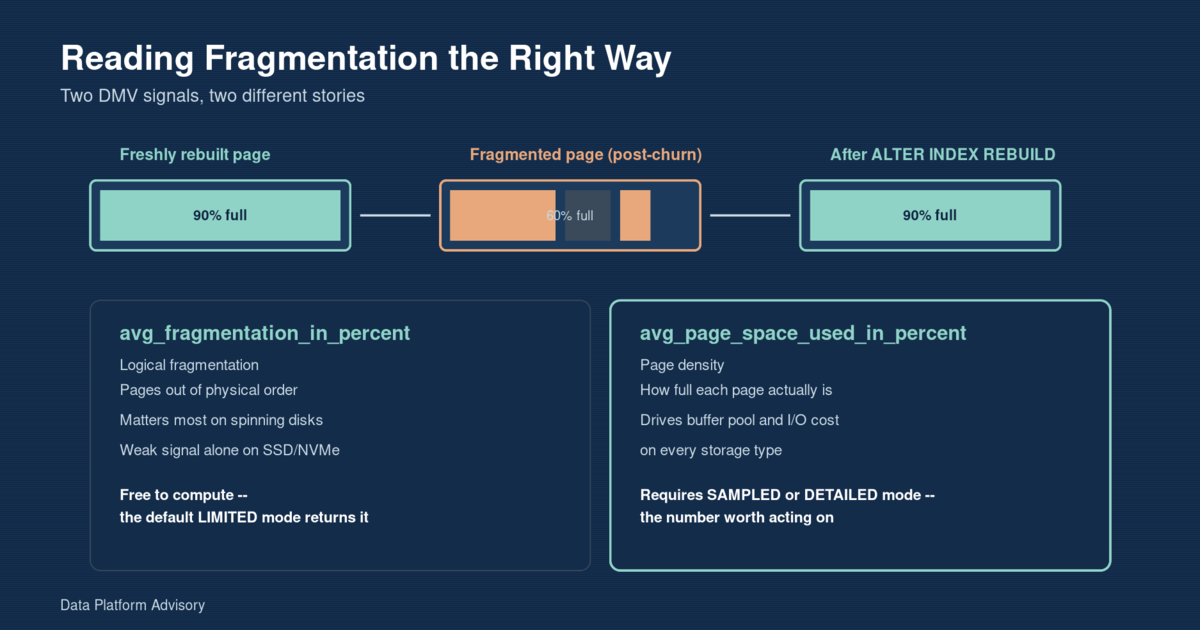
Rebuild an index when logical fragmentation is high and page density is low – not on logical fragmentation alone. avg_fragmentation_in_percent, the number most maintenance scripts check by default, measures whether pages are out of physical order, which barely matters on SSD/NVMe storage. avg_page_space_used_in_percent, the number most scripts never look at because it costs more to compute, measures how full each page actually is – and that’s the one that costs you in buffer pool memory and I/O regardless of storage type. This post reproduces realistic fragmentation from status-column churn on a 1.5-million-row table, shows how to read both signals correctly, applies an online rebuild with storage-appropriate thresholds, and closes with a scheduled way to catch the next index quietly headed the same way.
Key takeaways
avg_fragmentation_in_percentmeasures logical fragmentation (pages out of order) – a weak signal on modern SSD/NVMe storage, where random and sequential I/O cost about the sameavg_page_space_used_in_percentmeasures page density – how full each page is – and drives buffer pool and I/O cost on every storage type; it requiresSAMPLEDorDETAILEDmode, not theLIMITEDdefault most scripts use- Fragmentation on a real table comes from UPDATEs on indexed columns causing page splits, not from inserts – an ever-increasing key like an identity column barely fragments on its own
- Thresholds should account for storage: REORGANIZE at 10-30% / REBUILD above 30% on spinning disks; on SSD/NVMe, many practitioners push those to 30% / 60% before it’s worth the resource cost
- AI is a good fit for scanning every index on an instance daily and ranking candidates by both fragmentation signals – but which threshold, fill factor, and maintenance window fit a given index stays a human call
The problem
An Orders table has a nonclustered index on OrderStatus, supporting the dashboard queries that filter orders by status. The table isn’t unusually large – about 1.5 million rows – and nothing about the schema is wrong. But a weekly maintenance job flags the index at 68% fragmented, a report gets forwarded, and someone schedules an emergency rebuild during business hours “before it gets worse.”
That reaction is common, and it’s usually not wrong to rebuild – but it’s frequently wrong about why. The 68% figure comes from avg_fragmentation_in_percent, which measures logical fragmentation: whether the physical order of pages on disk matches their logical order in the index. On a spinning disk, out-of-order pages mean the read head jumps around instead of sweeping in one direction, and that’s genuinely expensive. On the SSD or NVMe storage running most production SQL Server today – on-prem or cloud-managed – there’s no read head. Random and sequential I/O cost is close enough that logical fragmentation alone is a weak predictor of anything.
The number worth checking instead is avg_page_space_used_in_percent – page density, how full each 8KB page actually is. A table with plenty of empty space per page needs more pages to hold the same data, which means more memory to cache it in the buffer pool, more I/O to read it from disk, and larger backups. That cost is real on every storage type, and it’s the one most default maintenance scripts never surface, because computing it requires running sys.dm_db_index_physical_stats in SAMPLED or DETAILED mode instead of the faster LIMITED mode that ships as the default in Ola Hallengren’s popular maintenance solution and most third-party tools (Ola Hallengren, SQL Server Index and Statistics Maintenance).
Here’s what actually caused the 68%: nothing to do with the identity-column primary key, which only ever grows at the end and barely fragments regardless of maintenance. The cause is the OrderStatus index itself, sitting on a column that gets UPDATEd constantly as every order moves Pending -> Shipped -> Delivered. Each of those UPDATEs changes an indexed value, which means the row may no longer belong where it currently sits in the index – and when a page doesn’t have room for the row in its new sorted position, SQL Server splits the page in two. Repeat that across a million status transitions and you get exactly the pattern in this table: high logical fragmentation and low page density, both driven by the same underlying cause, but only one of them showing up in the default report.
The expert fix
Pull both DMV columns for the table, not just the one:
SELECT
    OBJECT_NAME(ips.object_id)          AS TableName,
    i.name                              AS IndexName,
    ips.avg_fragmentation_in_percent    AS LogicalFragPct,
    ips.avg_page_space_used_in_percent  AS PageDensityPct,
    ips.page_count
FROM sys.dm_db_index_physical_stats(DB_ID(), OBJECT_ID('dbo.Orders'), NULL, NULL, 'SAMPLED') ips
JOIN sys.indexes i ON i.object_id = ips.object_id AND i.index_id = ips.index_id
WHERE ips.index_level = 0
ORDER BY ips.avg_fragmentation_in_percent DESC;
On the reproduction table used for this post, IX_Orders_OrderStatus comes back around 68% logical fragmentation and roughly 60% page density – both signals agree something is worth fixing. That agreement matters: a high fragmentation number with page density still near 90% is a much weaker case for a rebuild than the same fragmentation number paired with page density down in the 50s or 60s.
Which action to take, and at what threshold, should account for storage. Microsoft’s long-standing documented guidance is REORGANIZE between 5% and 30% logical fragmentation, REBUILD above 30% – written with spinning disks in mind. On SSD/NVMe-backed instances, which describes most cloud-managed SQL Server today, that 5% floor triggers on noise, and practitioners have converged on pushing both thresholds higher: REORGANIZE around 10-30%, REBUILD above 30%, or even REORGANIZE at 30% and REBUILD at 60% on the fastest storage, always weighed against page density rather than fragmentation percentage alone (Erik Darling, Why SQL Server Index Fragmentation Isn’t a Problem on Modern Storage Hardware).
With the diagnosis confirmed, rebuild online with a deliberate fill factor:
ALTER INDEX IX_Orders_OrderStatus ON dbo.Orders
REBUILD WITH (ONLINE = ON, FILLFACTOR = 90, MAXDOP = 0);
ONLINE = ON (Enterprise Edition or Azure SQL Database) keeps readers and writers unblocked during the rebuild – necessary on a live table this size. FILLFACTOR = 90 leaves 10% of each page empty on purpose, so the next round of status-value UPDATEs has somewhere to land without immediately splitting the page again – fixing today’s fragmentation without guaranteeing tomorrow’s. A fill factor that’s too aggressive (60-70%) wastes memory and disk on empty space that never gets used; one that’s too tight (100%) guarantees the very next write on that page causes a split. The right number depends on how often that specific index takes updates – there’s no single correct value across every table.
Re-running the fragmentation query afterward should show logical fragmentation near 0 and page density near 90%, matching the fill factor. SET STATISTICS IO, TIME ON around a representative query against the table should show fewer logical reads than before the rebuild – fewer, fuller pages to scan for the same result. The full seed script and before/after evidence are in the companion example on GitHub.
For lighter cases in the REORGANIZE band, ALTER INDEX ... REORGANIZE is always online regardless of edition and works incrementally in place – the tradeoff is that it doesn’t update statistics, so pair it with an explicit UPDATE STATISTICS if the table’s had significant write volume.
The AI-automation angle
Reading the right DMV columns for one table by hand is manageable. Doing it across every index on an instance, on a schedule, and surfacing only the ones actually worth someone’s attention is exactly the kind of scanning-and-ranking work worth automating – while leaving the decision of what to run, and when, with a person.
A scheduled, read-only query can check both fragmentation signals for every index above a minimum size, apply storage-aware thresholds, and log candidates to a review table instead of acting on them directly:
DECLARE @StorageType VARCHAR(10) = 'SSD';
DECLARE @ReorgThreshold DECIMAL(5,2) = CASE WHEN @StorageType = 'SSD' THEN 30.0 ELSE 5.0 END;
DECLARE @RebuildThreshold DECIMAL(5,2) = CASE WHEN @StorageType = 'SSD' THEN 60.0 ELSE 30.0 END;
DECLARE @MinPageCount INT = 1000;
DECLARE @MinPageDensity DECIMAL(5,2) = 75.0;

INSERT INTO dbo.IndexFragmentationLog
    (DatabaseName, SchemaName, TableName, IndexName, LogicalFragPct, PageDensityPct, PageCount, RecommendedAction)
SELECT
    DB_NAME(), s.name, t.name, i.name,
    ips.avg_fragmentation_in_percent, ips.avg_page_space_used_in_percent, ips.page_count,
    CASE
        WHEN ips.avg_fragmentation_in_percent >= @RebuildThreshold
             OR ips.avg_page_space_used_in_percent < @MinPageDensity THEN 'REBUILD'
        WHEN ips.avg_fragmentation_in_percent >= @ReorgThreshold THEN 'REORGANIZE'
        ELSE 'MONITOR'
    END
FROM sys.dm_db_index_physical_stats(DB_ID(), NULL, NULL, NULL, 'SAMPLED') ips
JOIN sys.indexes i ON i.object_id = ips.object_id AND i.index_id = ips.index_id
JOIN sys.tables t ON t.object_id = ips.object_id
JOIN sys.schemas s ON s.schema_id = t.schema_id
WHERE ips.index_level = 0
  AND ips.page_count >= @MinPageCount
  AND (ips.avg_fragmentation_in_percent >= @ReorgThreshold OR ips.avg_page_space_used_in_percent < @MinPageDensity);
Run daily against each database that matters, this produces a ranked queue: which indexes cross the threshold on either signal, ordered by severity. A human reviews the queue and decides, per index, whether the resource cost of a rebuild is worth it right now, what fill factor fits that index’s actual write pattern, and whether ONLINE = ON is even available on that edition. The watcher never issues ALTER INDEX itself – its job stops at producing a report nobody had to generate by hand. That’s the right boundary for this kind of automation: scanning every index on an instance and applying a consistent, storage-aware rule is tedious, mechanical work AI handles well; deciding the actual maintenance window and fill factor for a specific business-critical table is a judgment call that stays with whoever owns that workload. The full watcher query and a PowerShell scheduling wrapper are in the companion example.
If your maintenance job is still flagging every index at the default 5%/30% split without checking page density, or a rebuild schedule was set up years ago and never revisited for the storage it’s actually running on, see how a modernization engagement addresses this or get in touch and we can walk through what your indexes actually need.
Ivan Lima is a data engineer specializing in database modernization for AI systems. Get in touch if your database needs to be ready for what’s next.