Modern data platforms are no longer optional infrastructure components — they are business continuity engines. Whether you are a DBA, infrastructure engineer, or CTO, one truth remains consistent:
If your database goes down, your business stops.
High Availability (HA) and Disaster Recovery (DR) are not just technical features. They are operational survival mechanisms.
In this article, we’ll walk through the architecture of a fully isolated SQL Server HA/DR lab environment built using:
- Windows Server Failover Clustering (WSFC)
- SQL Server Always On Availability Groups
- Active Directory Domain Services
- Synchronous and asynchronous replication
- Internal network segmentation
This design mirrors enterprise-grade production topology — even though it runs inside a single Hyper-V host.
Why High Availability and Disaster Recovery Matter
Before diving into architecture, let’s align on business value.
High Availability (HA) protects against:
- Server crashes
- Hardware failure
- OS corruption
- Unexpected reboots
- Patch failures
Goal: Near-zero downtime and zero data loss.
Disaster Recovery (DR) protects against:
- Data center outages
- Site-level power failures
- Natural disasters
- Regional outages
- Catastrophic corruption
Goal: Business survival under worst-case conditions.
HA and DR solve different problems. Mature environments require both.
Architecture Overview
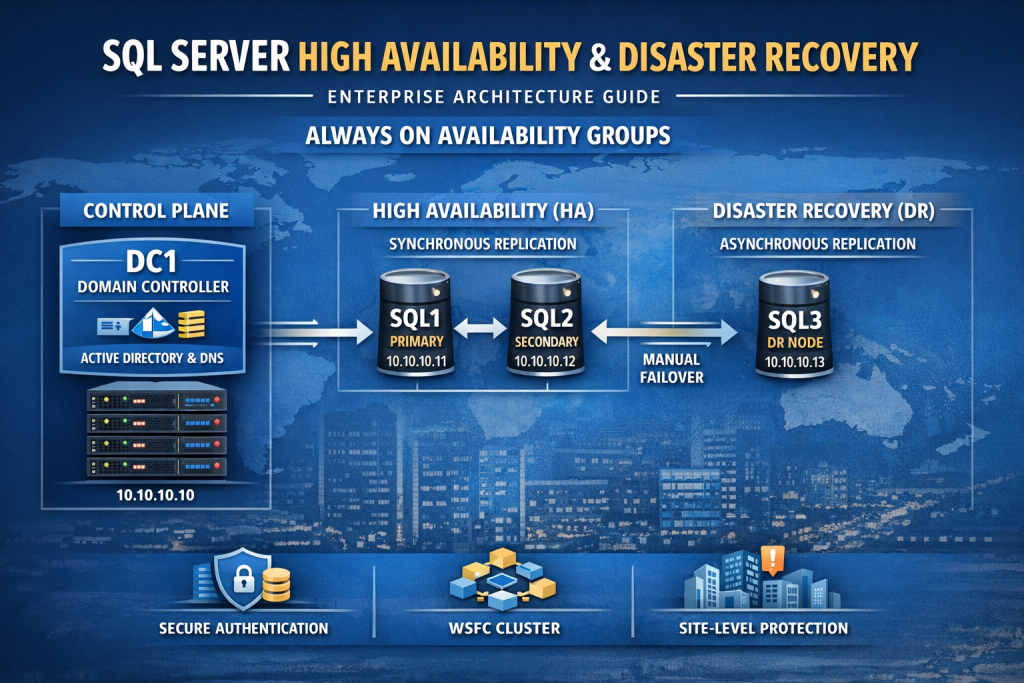
Our lab consists of four virtual machines:
| Server | Role | IP | Purpose |
|---|---|---|---|
| DC1 | Domain Controller | 10.10.10.10 | Identity + DNS |
| SQL1 | HA Node | 10.10.10.11 | Primary / Secondary |
| SQL2 | HA Node | 10.10.10.12 | Secondary / Primary |
| SQL3 | DR Node | 10.10.10.13 | Asynchronous Replica |
All machines live inside an internal Hyper-V virtual switch on subnet:
10.10.10.0/24
The Foundation: Identity First
A critical architectural decision often misunderstood by junior engineers:
Always On Availability Groups require Active Directory.
Why?
Because WSFC relies on:
- Kerberos authentication
- Cluster Name Objects (CNO)
- Virtual Computer Objects (VCO)
- Service Principal Names (SPNs)
- DNS integration
Without a Domain Controller:
- You cannot create a supported cluster.
- You cannot use Kerberos securely.
- You cannot implement enterprise-grade authentication.
DC1 – The Identity Control Plane
DC1 is not “just a user server.”
It provides:
- Active Directory Domain Services
- DNS resolution
- Kerberos ticketing
- Computer object management
- Security boundary enforcement
In architectural terms:
DC1 is the control plane.
SQL nodes are the data plane.
This separation is essential.
High Availability: SQL1 and SQL2
SQL1 and SQL2 form a synchronous Availability Group pair.
How Synchronous Replication Works
When a transaction is committed on SQL1:
- Transaction is written to log.
- Log record is sent to SQL2.
- SQL2 hardens log to disk.
- SQL1 confirms commit to client.
This ensures:
- Zero data loss
- Automatic failover capability
- Consistent database state
Automatic Failover Scenario
If SQL1 crashes:
- WSFC heartbeat detects failure.
- SQL2 is promoted to Primary.
- Availability Group Listener redirects connections.
- Applications reconnect automatically.
Downtime: seconds.
From a business perspective:
- No data loss
- Minimal interruption
- Transparent recovery
Disaster Recovery: SQL3
SQL3 operates as an asynchronous replica.
Why Asynchronous?
Because DR replicas are typically:
- In another data center
- In another region
- Over high-latency networks
Asynchronous mode:
- Does not wait for remote commit confirmation
- Prioritizes performance
- Accepts minimal potential data loss
Disaster Scenario
If both HA nodes fail (site outage):
- Administrator manually fails over to SQL3.
- SQL3 becomes Primary.
- Applications redirect to DR endpoint.
Business survives.
Why Static IPs and DNS Matter
Clustered systems are highly sensitive to name resolution.
Each node uses DC1 as DNS server.
This ensures:
- Reliable node-to-node communication
- Proper cluster name registration
- Listener name resolution
- Kerberos authentication integrity
DNS misconfiguration is the #1 cause of cluster instability.
Security Architecture Considerations
Why Separate DC and SQL?
Combining them:
- Increases attack surface
- Violates separation of duties
- Creates catastrophic single point of failure
- Exposes domain identity to SQL attack vectors
Enterprise standard:
- Identity servers are isolated.
- Database servers are isolated.
- Roles are separated.
Why Domain Accounts?
Domain accounts provide:
- Centralized governance
- Password policy enforcement
- Auditing capability
- SPN registration support
- Kerberos delegation
Local accounts break distributed trust models.
Executive-Level Risk Analysis
| Failure | Impact | Mitigation |
|---|---|---|
| SQL1 crash | No data loss | SQL2 auto failover |
| SQL2 crash | No data loss | SQL1 continues |
| Both HA nodes crash | Service interruption | Failover to SQL3 |
| DC1 crash | Authentication degradation | Deploy second DC in production |
| DNS misconfiguration | Cluster failure | Proper DNS governance |
Why This Architecture Matters
This is not a “demo lab.”
It represents:
- Enterprise separation of control and data planes
- Distributed identity architecture
- Zero-data-loss HA design
- Cross-site DR resilience
- Cluster-based service abstraction
Even though it runs inside a laptop, logically it models:
- On-prem enterprise
- Hybrid architecture
- Cloud migration foundation
Preparing for Production
In production, you would:
- Deploy minimum 2 Domain Controllers
- Separate subnets per site
- Use dedicated storage volumes
- Implement monitoring
- Configure backup strategy
- Enforce least-privilege service accounts
- Document RTO and RPO targets
Strategic Business Takeaway
For DBAs:
- HA/DR is no longer optional skillset.
- Always On architecture is core competency.
- Understanding identity integration is critical.
For Executives:
- HA protects uptime.
- DR protects the company.
- Identity integration is foundational.
- Architecture decisions determine business continuity.
Database resilience is not a checkbox feature.
It is an architectural commitment.
What Comes Next
After infrastructure foundation:
- Install Failover Clustering feature
- Validate cluster readiness
- Create Windows Server Failover Cluster
- Install SQL Server
- Enable Always On
- Create Availability Group
- Configure Listener
- Test automatic failover
- Simulate DR event
- Automate validation
This is where operational maturity begins.
Final Thoughts
Building a SQL Server HA/DR lab is not about replication alone.
It is about:
- Identity design
- Network segmentation
- Security boundaries
- Distributed systems engineering
- Business continuity planning
High Availability keeps your systems running.
Disaster Recovery keeps your company alive.
Architect wisely.